Ground fringe
An object standing on a planet used to meet the ground along a perfectly straight line. Nothing in nature does that: there is always sand, dust or gravel banked against whatever sits on it, and the absence of it is what makes a scene read as a model placed on a table.
The ground fringe paints the terrain's own colour and texture over the bottom of an object, with an irregular, wind-drifted edge.
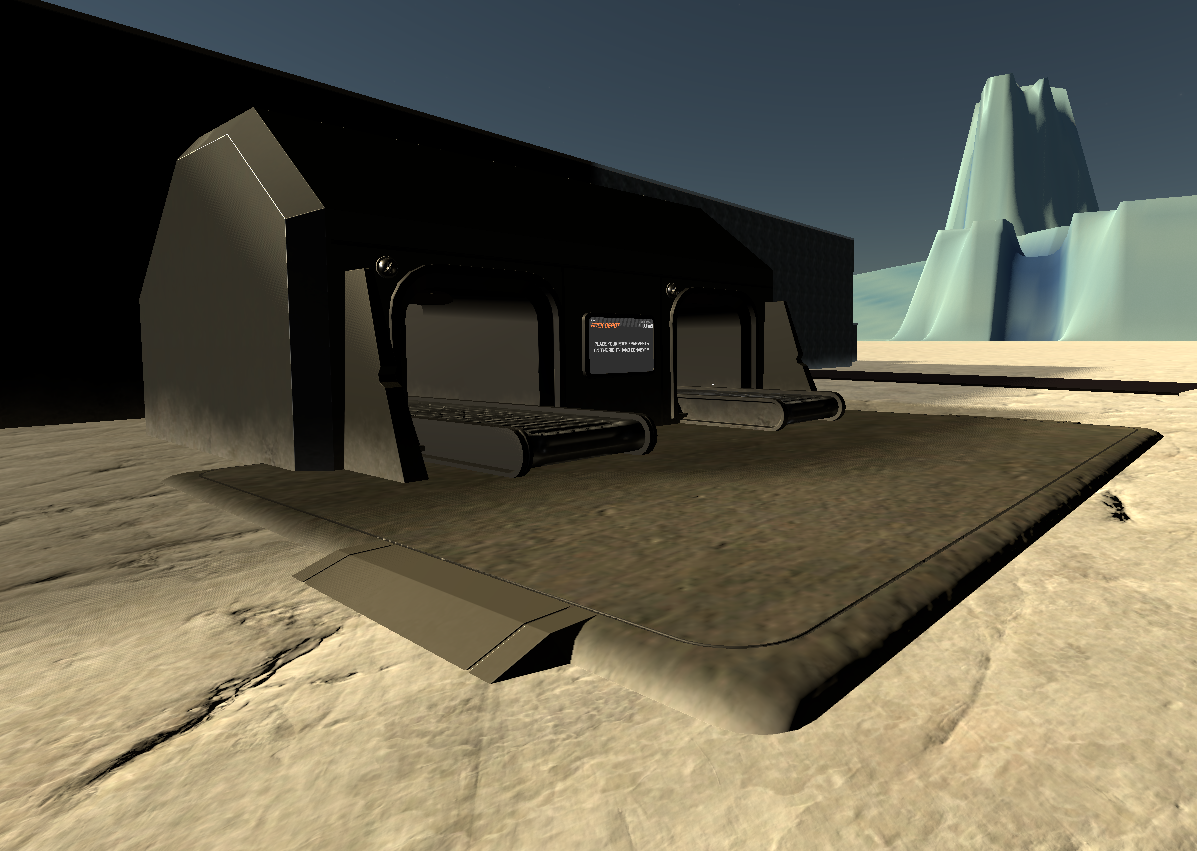
What it actually does
Three things, and it is worth knowing which is which when something looks wrong:
- It reads the material the ground is really drawn with at that spot — which is not always the same shader from one biome to the next — and borrows its colour and its texture.
- It fades that out over the first few dozen centimetres, with the limit displaced by noise at three scales, so the band rises and falls along a wall instead of keeping one thickness.
- At the contact it lights the band as though it were ground, not as part of the wall. Without that, a wall in shadow keeps a dark band while the sand beside it is in full sun, and the cut line comes straight back as a step in brightness.
Its colour is the ground's, by the terrain's own rule
The colour comes from GroundLook (scenes/common/ground_look.gd), the one place that answers
"what colour is the ground here" for the fringe, the dust the wheels and feet raise and the
wind-blown dust:
- The tint is the colour the terrain bakes into its vertices at that spot: the rock of the zone
(or the planet's default rock) shaded the way the terrain shades it, the biome's colour elsewhere.
It is the rule the roads already use (
PlanetChunk.road_ground_tint). An earlier version used the rock's bare light/dark mottle instead, and two buildings on the same plateau came out one pale and one rust-red. - On textured ground (the corundum plateaus, all of Tarsis 3) the fringe multiplies the ground's
texture by that tint, as strongly as the ground shader does (
vertex_color_strength, copied from the ground material). Without it the band showed the bare texture: white marble on every plateau. - The dust's colour is what the ground shows on average: the texture's mean colour times the tint.
Where the ground is
The band is laid on the ground as drawn: the pad a building is seated on and the road beds
included (PlanetData.carved_surface_dist), not the raw relief, which can stand metres above or below
a pad. It is measured two frames after the object appears, then again 2 s and 10 s later: the tiles
under a building often stream in after it, and a pad is re-seated when a neighbour's level changes.
To see each measure, put debug_fringe_probe=true in the [debug] section of client.ini: one
[FringeProbe] line per object, with its clearance over the drawn ground and over the raw relief, the
band height and whether it got a fringe.
Networked props: nothing to do
Any prop spawned through the network registry gets the fringe automatically. You do not add anything, and you do not need to know this page exists.
That includes rocks, crates, pallets, the cargo depot, the mining depot, the habitations — and any
prop added to the registry later. The hook lives at the single place props are instantiated, so a new
entry in server/client.gd inherits the effect with no code change at all.
Buildings and structures placed directly in a planet scene are not networked props, so they are not covered. That is the case below.
Placing your own object: add the component
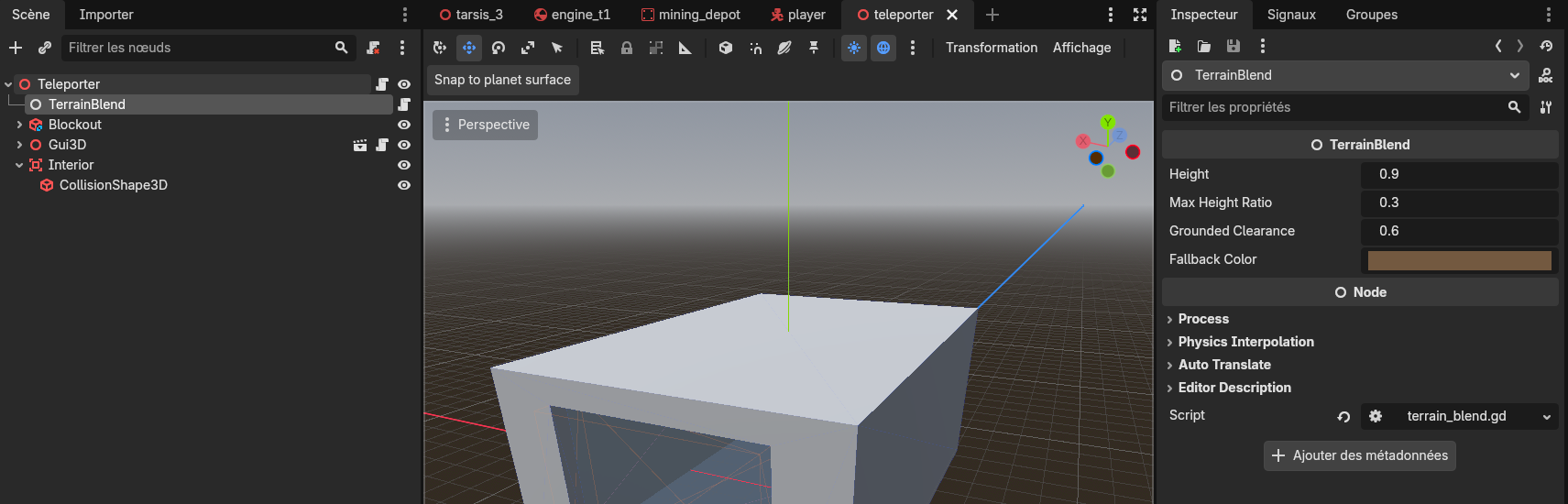
If you drop a structure straight into a planet scene — the way the teleporter and the wind valley are placed — you add the component yourself. It takes one node:
- Select the root of your object in the scene tree.
- Add Child Node →
Node. - Drag
scenes/common/terrain_blend.gdonto it.
The node's name does not matter; the type is what is recognised. Name it TerrainBlend anyway, so
the next person recognises it at a glance.
That is all. The component finds the planet on its own, measures the ground under the object, and takes the fringe off again if the object ever leaves the ground.
A networked prop that carries its own TerrainBlend node keeps it: the automatic path finds it and
leaves it alone. That is how you give one asset a taller or shorter band than the default.
Settings on the node
| Setting | Default | What it does |
|---|---|---|
height | 0.9 m | How high the sand reaches, at most. |
max_height_ratio | 0.3 | Hard ceiling as a fraction of the object's own height. A 0.9 m band would otherwise swallow a 0.5 m crate whole. |
grounded_clearance | 0.6 m | Above this height off the ground, the object is treated as airborne and loses its fringe. |
fallback_color | sand brown | Used only when the biome yields no usable colour. |
Settings shared by every object
These live on the material, assets/_universe/_shared/materials/terrain_blend.tres, and changing one
changes it everywhere. Edit it in the Inspector and restart the game — the per-texture copies are made
at startup, so an edit made mid-session only touches the template.
| Setting | Default | What it does |
|---|---|---|
blend_noise_strength | 0.6 | How much the limit rises and falls. Raise it for a more broken edge. |
blend_noise_scale | 0.15 | Size of the pattern. Lower it for longer, wider tongues of sand. |
blend_noise_swell | 0.22 | The low, slow octave — the one that makes the band deep in places and thin in others. |
blend_curve | 2.0 | How fast the band gives way as it climbs. Higher fades sooner. |
blend_normal_lift | 0.85 | How much the band is lit like ground rather than like the wall. |
blend_face_weight | 1.0 | How much a horizontal surface loses the band. A slab is a floor, not a contact line. |
blend_inward_weight | 1.0 | How much an inward-facing wall loses it — the inside of a building. |
What never gets a fringe
Four exclusions, all deliberate:
- Planets. They are networked props too, and a celestial body is what everything else rests on.
- Vehicles. They drive, and the band is measured when an object settles, not every frame — a truck would carry a strip of sand from wherever it was last parked.
- Players and NPCs. A character standing inside a building is reparented under it, so without this the building's fringe would walk into their legs.
- Any mesh that already carries a
material_overlay— the cargo depot's concrete floor, the mining depot's conveyor belt. There is only one overlay slot per mesh, and taking it would silently undo whatever was there.
Known limits
- A street can look like a room. The interior test compares a face's normal to the object's
centre, which is geometry, not space: it cannot tell the inside of a room from an alley between two
halves of the same object. If an asset is shaped that way, lower
blend_inward_weighton it. - No atmospheric haze on the band. The aerial-perspective pass reads a copy of the screen taken before transparent surfaces are drawn, so nothing transparent can receive the veil. The band simply stops at 150 m, where the missing haze is under one step of 8-bit colour.
- The pattern is anchored to the object, not to the terrain grid: the same grain as the ground, not the same position. On a vertical face — the only place it is drawn — this is not visible.
Measuring its cost
Put debug_no_terrain_blend=true in the [debug] section of your client.ini. The component then
attaches nothing at all, so this removes the draw calls and not merely the shader's cost: compare
draw= and rgpu= on the [CPerf] heartbeat with and without it, and the difference is the real
price of the feature.
With it on, objects meet the ground on a hard cut line again.