Audio in DyingStar
This section is for sound designers. It explains how a sound gets into the game, the file rules to follow, and where each object's sounds are configured. Good news: adding a sound is almost never code — you drop a file in the project and pick it in a slot in the Godot Inspector.
How sound works in the game
Every sound in DyingStar is a positional 3D sound: it plays at the object that makes it (a player,
a truck…) and gets quieter with distance, so you can tell where it comes from. There is no music/UI
mixer to wire — a shared helper (Sfx3D) plays every one-shot the same way, and each object exposes
its sounds as @export slots grouped under Audio SFX in the Inspector.
Each slot comes with the same five knobs, so a knob means the same thing everywhere:
| Knob | What it does |
|---|---|
| Sound | the audio file to play (leave empty = silent) |
| Db | volume in decibels (0 = nominal, negative = quieter) |
| Falloff | the reference distance where the sound is at nominal volume |
| Distance | hard cut-off distance (beyond it the sound isn't computed — saves CPU) |
| Attenuation | how it fades with distance (see below) |
Attenuation picks the fade curve to match the kind of sound:
| Attenuation | Curve | Use for |
|---|---|---|
REALISTIC | 1 / distance | engines, general world sounds |
VERY_SHORT | 1 / distance² (dies fast) | footsteps, clicks, small mechanisms |
FAR_REACHING | logarithmic (carries far) | horns, sirens |
FLAT | no fade | rare — non-diegetic |
The game server has no audio — sounds play on each client, from the state that's replicated to them. So other players hear your footsteps, your torch click, a truck's horn… all without sending any audio over the network. Nothing to do on your side; just know a sound you add is heard by everyone nearby.
File rules
Format: .mp3 or .ogg (not .wav)
Ship sounds as .mp3 or .ogg — they're compressed, so the game download stays small. Avoid
.wav (uncompressed, many times larger) except for very short one-shots where it's unavoidable.
Trim the silence — cut your sounds tight
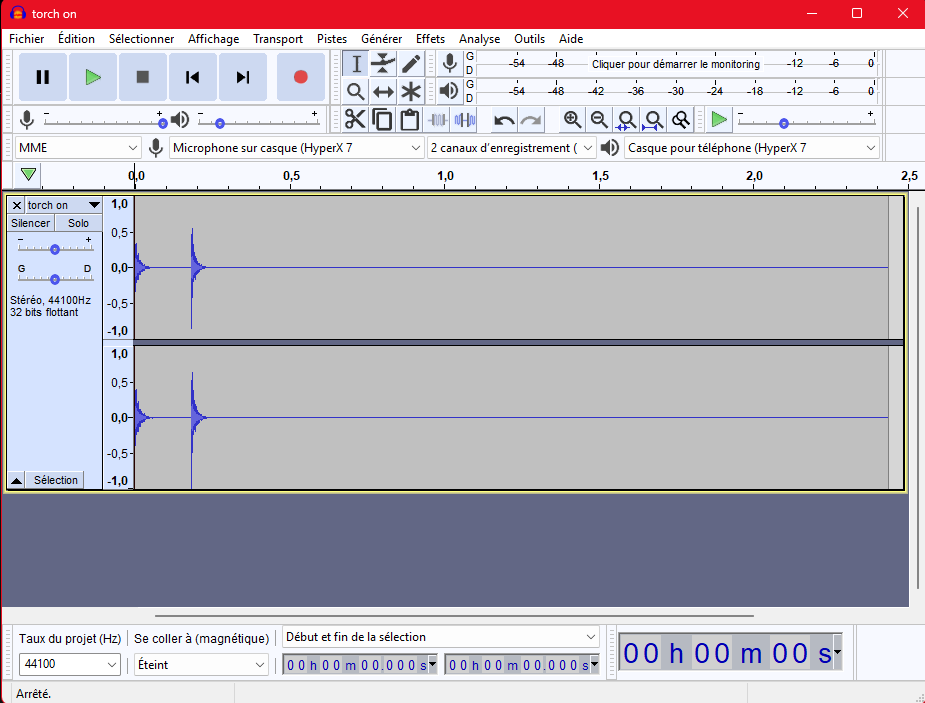
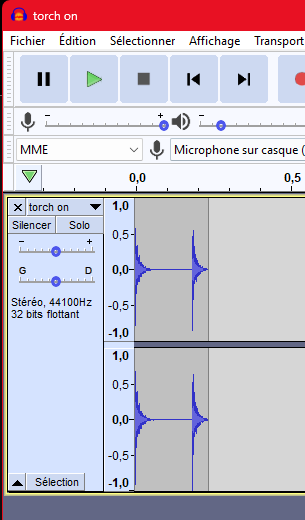
A sound file must contain only the audible sound, with no dead space before or after it. Extra silence still ships in the download, and a one-shot with a long tail of silence delays anything that waits for it to finish.
Open the clip in an editor (Audacity here) and cut the leading and trailing silence so the waveform fills the whole file:
❌ Don't — the sound is a short burst but the file runs on with seconds of silence:
✅ Do — the same sound, trimmed so the file is just the burst, no dead space:
For a held / looping sound (a running engine, a held horn) you don't need to set the Loop flag in
Godot's import dock — the game forces looping on at runtime (Sfx3D.as_looping). Just deliver a clean
loop with no gap or click at the seams. One steady sample is enough: the engine loop is pitched and
made louder as the RPM rises, so a single idle recording covers idle → full throttle.
Where the files live
Audio assets go under assets/_universe/audio/:
ambience/— looping ambiences (sandstorm…)music/— trackssfx/— one-shots and short loops, split by source:sfx/characters/— footsteps (per surface: grass / metal / sand / stone), jump…sfx/machine/,sfx/machine/tools/— buttons, the torch on/off…sfx/vehicles/ground/— the truck's doors, engine, horn…sfx/ui/— menu buttons
Follow the existing folders and naming; don't invent a new layout.
Which sounds does each object have?
The actual list of sounds per object lives on that object's Audio SFX group in the Inspector:
- Player sounds — footsteps, jump, torch on/off.
- Surface sounds — how a footstep or a dropped crate picks the samples of the material underfoot, and how to add a new surface.
- Vehicle sounds — doors, engine (start / stop / running loop), lights, handbrake, horn, and the tyres — a scuff when the wheel is turned, a roll that rises with speed.
- Prop & tool sounds — carriable crates, and the perforator's drill loop, equip and miss.