Player sounds
Audio in DyingStar explains positional sound, the five knobs on every slot, and the file rules (mp3/ogg, trim the silence). This page is just where the player's sounds are and what each one is.
The player's sounds are set on the Player node, in the Audio SFX group of the Inspector. Every
slot is optional — leave the Sound empty and that sound is simply silent. They play on every
player body, your own and the other players', so everyone hears everyone.
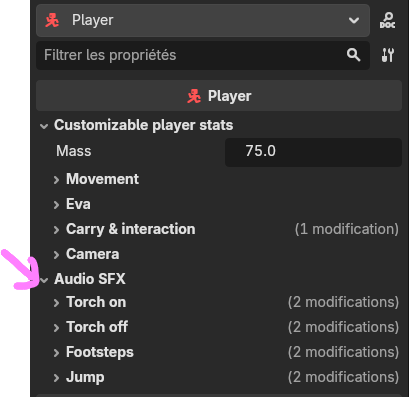
The slots
| Group | Sound | When it plays |
|---|---|---|
| Torch on | sfx_torch_on | the flashlight is switched on |
| Torch off | sfx_torch_off | the flashlight is switched off |
| Footsteps | sfx_footsteps (a SurfaceSounds resource) | one step per distance walked, with the samples of the surface underfoot (see below) |
| Jump | sfx_jump | the player jumps |
Each group has the usual Db / Falloff / Distance / Attenuation knobs next to the sound. Footsteps,
torch and jump default to VERY_SHORT attenuation (they die off fast — small, local sounds).
Footsteps — one set of samples per surface
sfx_footsteps is not a list of clips but a SurfaceSounds resource: the game looks at what you
are standing on, reads its family (metal, sand, snow…) and plays that family's samples. Give
each family several samples — the game picks a random one per step and never plays the same one
twice in a row, and adds a small random pitch change, so walking doesn't sound like a machine gun.
Authoring the resource, the family vocabulary, and what to do when a surface plays the wrong sound are all on the Surface sounds page.
Two knobs on the Player tune the cadence itself:
- Footstep Stride — one step every N metres walked (not per second). The cadence then follows speed on its own: running covers ground faster, so the steps speed up, with no timer to set.
- Footstep Pitch Jitter — kept on the resource, applied to every family alike.
Steps are silent while airborne (jumping/falling) and while climbing, so only real walking makes noise.