Character animation
How DyingStar networking works explains the multiplayer basics in plain language, and Player network management covers how the player replicates. This page is about the animated body that sits on top of that.
Every player now has an animated body: you see your own arms and legs in first person, and other players walk, run, jump, crouch, sit, carry and emote in front of you. The character model is rigged on the Quaternius Universal Animation Library (UAL) skeleton, and plays a copy of that library converted for its own body (see Adding a character model).
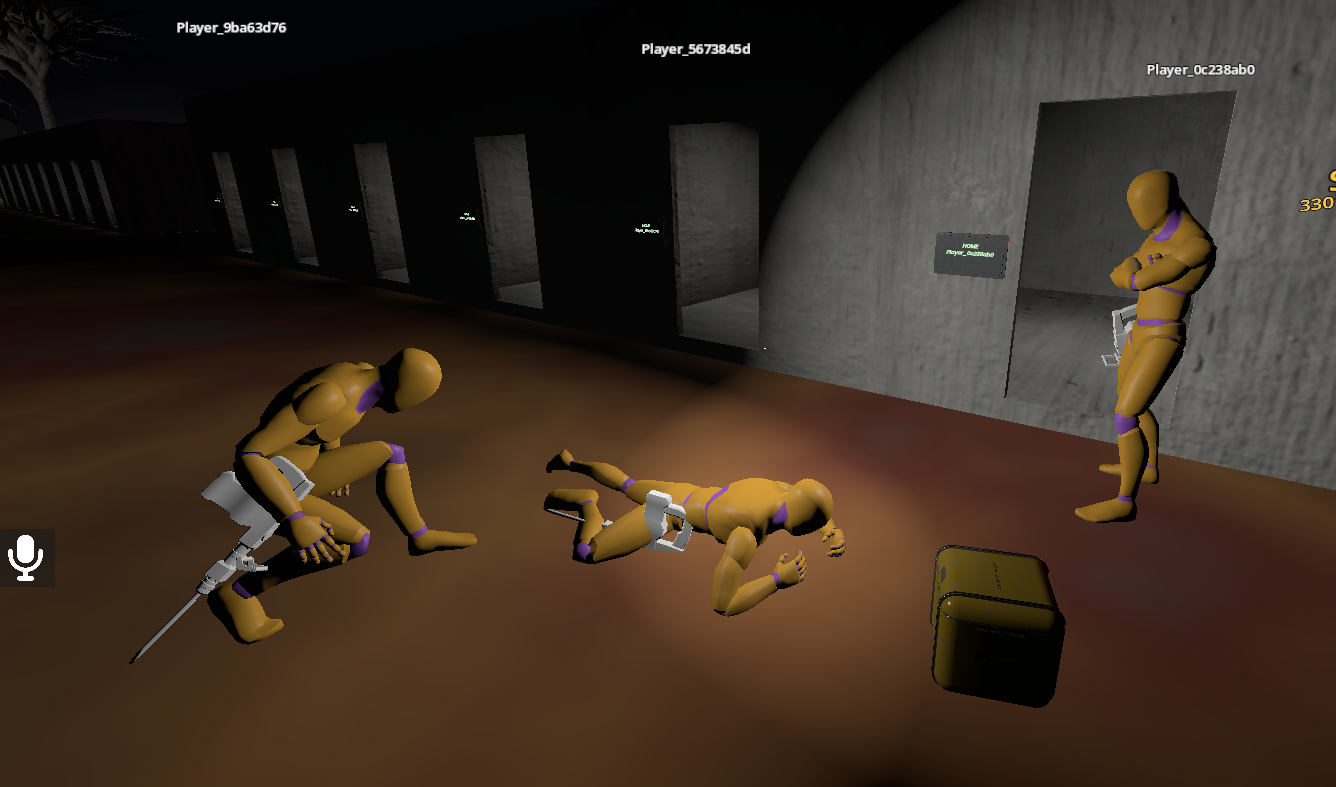
The one idea to remember: animation is derived, not sent
No animation data ever travels the network. We never send "play the walk clip" or a bone pose. Instead, every client re-derives the animation from state that is already replicated for other reasons:
- walking / running → from the body's own position change (speed + direction),
- jump, landing, emote, sit, interact → from the whitelisted
actionevent field, - carrying → from the
carryingproperty, - crouch / prone → from the
stanceproperty, - where the head looks → from
head/head_yaw.
The same controller runs on your body and on every remote avatar, because both sides read the same already-present state. This keeps the wire cheap (only one small property was added for the whole feature — the seated look yaw) and it means a new animation usually costs zero networking.
If you add a gameplay state that should show as an animation, ask first: is this already replicated? If yes, the animation is free — just read it. Only add a new replicated property when the animation truly cannot be derived from existing state (see Player).
The pieces
| Script / resource | Role |
|---|---|
scenes/_universe/characters/humanoids/human_puppet.tscn | The visible body: the character model, plus an AnimationPlayer holding the animation library converted for it. Child of the player body. |
addons/dyingstar/build_retargeted_animations.gd | Editor script that converts the animation library for a given character model. Run once per model (see below). |
character_animator.gd (class_name CharacterAnimator) | The controller. One node, same code for the owner and remotes (DRY). Picks and cross-fades the clip each frame from the derived state. |
character_animation_set.gd (class_name CharacterAnimationSet) | A Resource mapping each logical state (idle, walk, jog, crouch, jump, sit…) to a clip name. Data only — one set per model, so a different rig is retargeted by swapping the set, not the code. |
scenes/props/emote_catalog.gd (EmoteCatalog) | The emote-wheel layout (which clip each emote plays). |
The animator reads a small locomotion sample (smoothed speed, direction, airborne, stance,
carrying, yaw-rate…) that PlayerClient computes once per frame and caches on the body, so the
footsteps and the animation share one computation.
_LoopGodot's glTF importer strips a trailing _Loop from clip names (and marks them looping). So the
source clip Idle_Loop becomes Idle — the names in the CharacterAnimationSet are the source
names without _Loop.
Where the clip names live (the @export fields)
The clip vocabulary is the resource
scenes/_universe/characters/humanoids/ual_animation_set.tres (a CharacterAnimationSet). Open it
in the Godot Inspector and you get one @export field per state, grouped by family
(Idle · Walk · Run · Sprint · Crouch · Prone · Turn · Jump · Carry · Sit · Emote). Each field holds
the name of the clip to play for that state:
| Family (group) | Example fields → clip name |
|---|---|
| Walk | walk_fwd → "Walk", walk_bwd → "Walk_Bwd", walk_left/right, diagonals |
| Run | run_fwd → "Jog_Fwd", run_bwd, run_left/right, diagonals |
| Crouch / Prone | crouch_idle → "Crouch_Idle", crouch_fwd…, prone_idle → "Crawl_Idle"… |
| Jump | jump_start, jump_loop, jump_land |
| Sit | sit_driving → "Driving", sit_passenger → "Sitting_Nodding" |
| Emote | emote_dance, emote_wave, … (referenced by EmoteCatalog) |
An empty field means "this model doesn't have that clip" → the animator falls back to a sensible
one (nearest direction → forward → idle). The set is assigned to the CharacterAnimator node's
Anim Set slot in human_puppet.tscn. So pointing a state at a different clip is just editing a
text field in the Inspector — no code, and a different model gets its own set, same controller.
What drives what
| You see | Derived from | Notes |
|---|---|---|
| Idle / walk / jog | Body position delta → speed + 8-way direction | Mouse-wheel walk speed (0.5–3) also warps the walk playback so the feet don't slide. Sprint (Shift) is a fast tier. |
| In-place turn | Body yaw-rate while standing still | Plays Turn90_L/R. |
| Jump start / loop / land | action = "jump:<n>" and "land:<n>" events | See the event-field idiom. |
| Crouch / prone gait | stance (0/1/2) | Directional crouch / crawl clips, with enter/exit transitions. |
| Carrying | carrying (bool) | You can only carry standing (see Player). |
| Sit / drive / passenger | Seat state (seat:/unseat: events) | See Vehicles. |
| Emote | action = "emote:<key>:<n>" | Chosen from the emote wheel (T). |
| Head aim | head (pitch) + head_yaw (seated) | See below. |
First person: your own body, without the seasickness
For the local player the puppet is the visible body (arms, legs, tool). Four things keep it comfortable, and each of them exists because its absence was visible:
Your own head and neck are hidden
Both bones are scaled to almost nothing for the owner. Remote players keep theirs, of course.
The neck is a separate bone. With only the head collapsed, looking straight ahead was fine and looking up, left or right swept the view through your own throat. No camera height fixes that — the geometry is around the eye, not below it.
Collapsing the neck drags the head bone down with it, and that is harmless here: the camera is
anchored to CameraPivot in the scene and takes only a delta from the head bone, measured against
a rest captured with the same collapse applied, so a constant shift cancels on both sides. The arms
hang off the spine, not the neck.
The eye is the centre of rotation
Camera3D sits at CameraPivot, not offset from it, and the eye is nudged a little forward of the
head bone (head_cam_forward) where a real one is. The camera used to hang 6.3 cm above and 8.5 cm
behind the pivot, so looking around swung it on a 10 cm arm and the viewpoint translated — plainly
visible at the wheel, where the dashboard gives you a fixed reference to see it against.
The camera follows the head, split by axis
The head bone does two unrelated things, and they must be treated differently:
| What it is | How it is handled | |
|---|---|---|
| Bounce | up/down and side to side, a few times a second | Damped by head_cam_amount — this is what makes a first-person view sickening |
| Lean | forward, as the torso pitches over from a walk to a jog to a sprint | Followed in full, always |
Damping the lean walks the body out from under the camera and you end up looking at your own neck. So
head_cam_amount can be taken all the way to 0 for a perfectly steady view without buying the neck
back — which was not possible when one setting damped both.
A filter was tried. It cannot work: slow enough to ignore the stride is also slow enough to lag a whole gait change, and the neck showed for the half second it took to catch up. The two motions share a time scale; they do not share an axis.
Three heights, three settings
They used to be one number, so tuning any of them broke the others:
| Setting | What it moves | |
|---|---|---|
| Standing eye | CameraPivot.position.y (in player.tscn) | the camera, on foot |
| Seated body | seat_body_drop (Player) | the model on its seat |
| Seated eye | seat_eye_height (Player) | the camera, at the wheel |
_ride_seat used to derive the seated body position from the standing eye height, so lowering the
pivot 3.7 cm to fix the on-foot view raised the seated body by exactly that and the driver floated. And
seat_eye_height was applied to the body origin too — camera and body moved rigidly together, so no
value ever changed what you saw.
seat_body_drop is a full offset, not a heightAll three components matter. Its -0.17 on Z is the pivot's forward set-back inside the skull; reducing
it to a height alone slid every seated body 17 cm.
The seat ride owns the camera while you are seated.
Head-look
The head bone tilts to follow where the player aims, so others can read your gaze:
- Standing — only the pitch (up/down) is needed on the head, because the body already turns
with the yaw. Pitch is the existing
headproperty. - Seated — the body is locked in the seat, so the head follows both yaw and pitch. The seated
yaw is the one small property added for this whole feature:
head_yaw(0 while standing).
Both are clamped so the neck never snaps to an impossible angle.
Emote wheel
Hold T to open a radial menu of emotes (dance, wave, sit on the ground, rock-paper-scissors…).
Picking one sends the emote to the server, which validates it and replicates it as an
action = "emote:<key>:<n>" event, so every player sees it play.
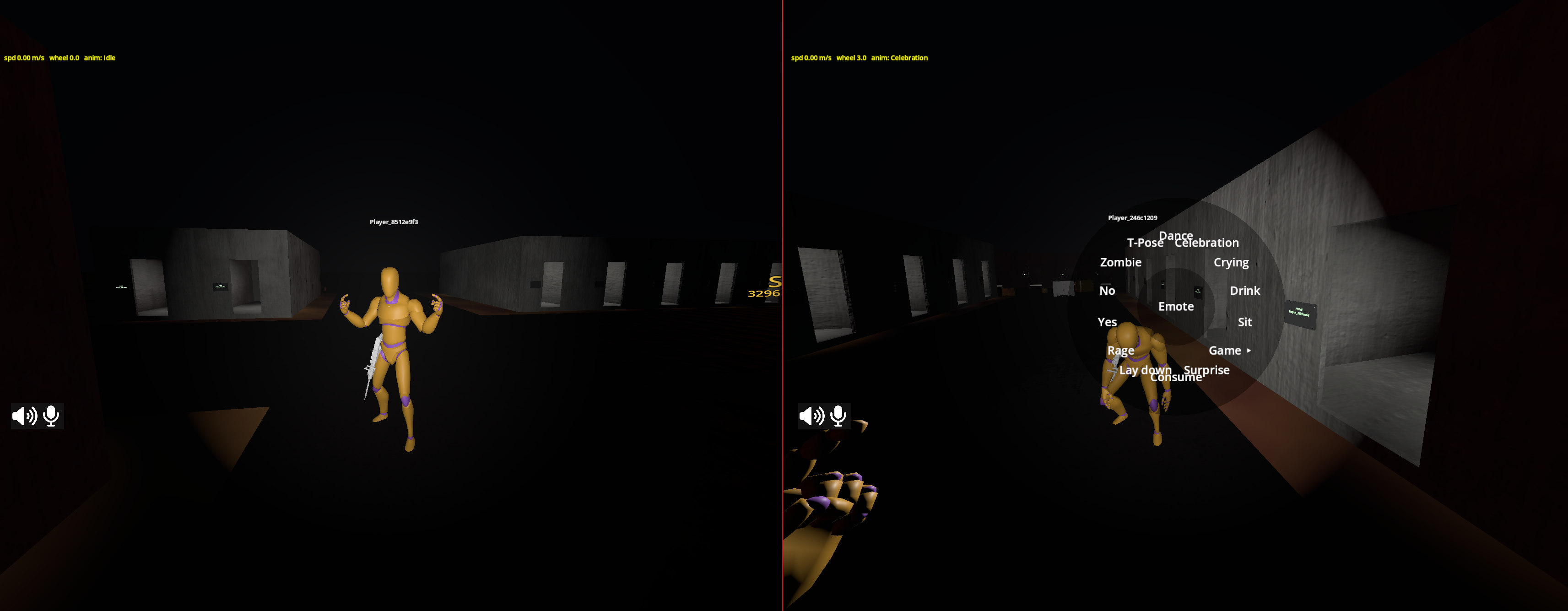 The emote clips live in the
CharacterAnimationSet; EmoteCatalog only says which set field each wheel entry uses.
Adding a character model
The controller works on clip names, not on a specific model, so a new character is mostly art. But the shared animation library has to be converted for that body first, and that step is not optional.
Why a conversion is needed
Two rigs can carry the exact same bone names and still not play the same animation. An animation stores each bone's rotation as an absolute value, not as an offset from the rest pose — so a clip puts the character's bones wherever the library's bones were, not where the equivalent movement would put them.
That is fine as long as both rigs rest the same way. They usually do not: the library rests in a T-pose (arms straight out), while a character delivered by an artist normally rests in an A-pose (arms down at about 45 degrees). Play one on the other and every arm is off by that gap: elbows bend the wrong way, the head rolls instead of turning.
Godot's import-time rest fixer can force the two rest poses to match, and it is tempting because it is one checkbox. It does it by moving the character's bones — but the mesh is skinned to its own rest, so every bone it straightens deforms the body. Expect a belly pushed forward, toes lifting off the ground, and a lump at the shoulder. This was tried and measured; the settings only move the deformation from one bone to another.
The steps
- Rig the model on the UAL skeleton — Unreal-style bone names (
pelvis,spine_01,upperarm_l,head…). You do not have to match the library's rest pose or its proportions; only the bone names and the hierarchy have to line up. - Import both glTF with retargeting on. Select the
.glbin the FileSystem, Import dock, Advanced…, pick theSkeleton3Dnode, and under Retarget assign a Bone Map using theSkeletonProfileHumanoidprofile. Do this on the character and onUALDyingStar.glb. Leave every Rest Fixer option off (see the warning above) — the bone map is only there to give both rigs the same bone names. - Convert the library. Open
addons/dyingstar/build_retargeted_animations.gd, point itsTARGET_SCENEat your model, and run it (File ▸ Run, orCtrl+Shift+X). It writes a<model>_animations.resnext to the model. Re-run it whenever either glTF changes — the file is generated output, never edited by hand. - Wire the puppet. In
human_puppet.tscn, instance the model, add anAnimationPlayerwhoselibrariesholds that.resand whoseroot_nodepoints at the model, and assign aCharacterAnimationSeton theCharacterAnimator.
Because the whole system reads replicated state, the new model animates the same way in first person and for remote avatars, with no code and no extra networking.
What the conversion does and does not carry
| Carried over | Left to the character |
|---|---|
| Every bone rotation, as the turn away from the rest pose measured in world space — the one quantity that means the same thing on two bodies of different shape | Bone lengths: a shorter forearm stays shorter. Only the hip height is scaled, so a taller character does not sink into the floor |
| The collar bones, neck and head keep the character's own rest direction — those rest the same way in both rigs and differ only in build | Fingers are not animated at all (see below) |
Finger motion does not survive a change of hand: replayed on another rig it closes past the anatomical
stop until the fingertips sink into the palm. The converter therefore leaves fingers at the character's
own rest, which reads as a relaxed hand. There is no finger-level gameplay today. When a grip pose is
needed, author it on the character rather than importing one — drop FROZEN_GROUPS in the script
and the finger tracks come back.
An animation track finds its bone by node path, so the model's armature node has to carry the name
the library addresses. Blender names it after whatever the artist called the object (test1,
character_v3…). A post-import script (addons/dyingstar/post_import_armature_alias.gd) renames it, so
you do not have to think about it — just leave that script in the model's Import Script field.
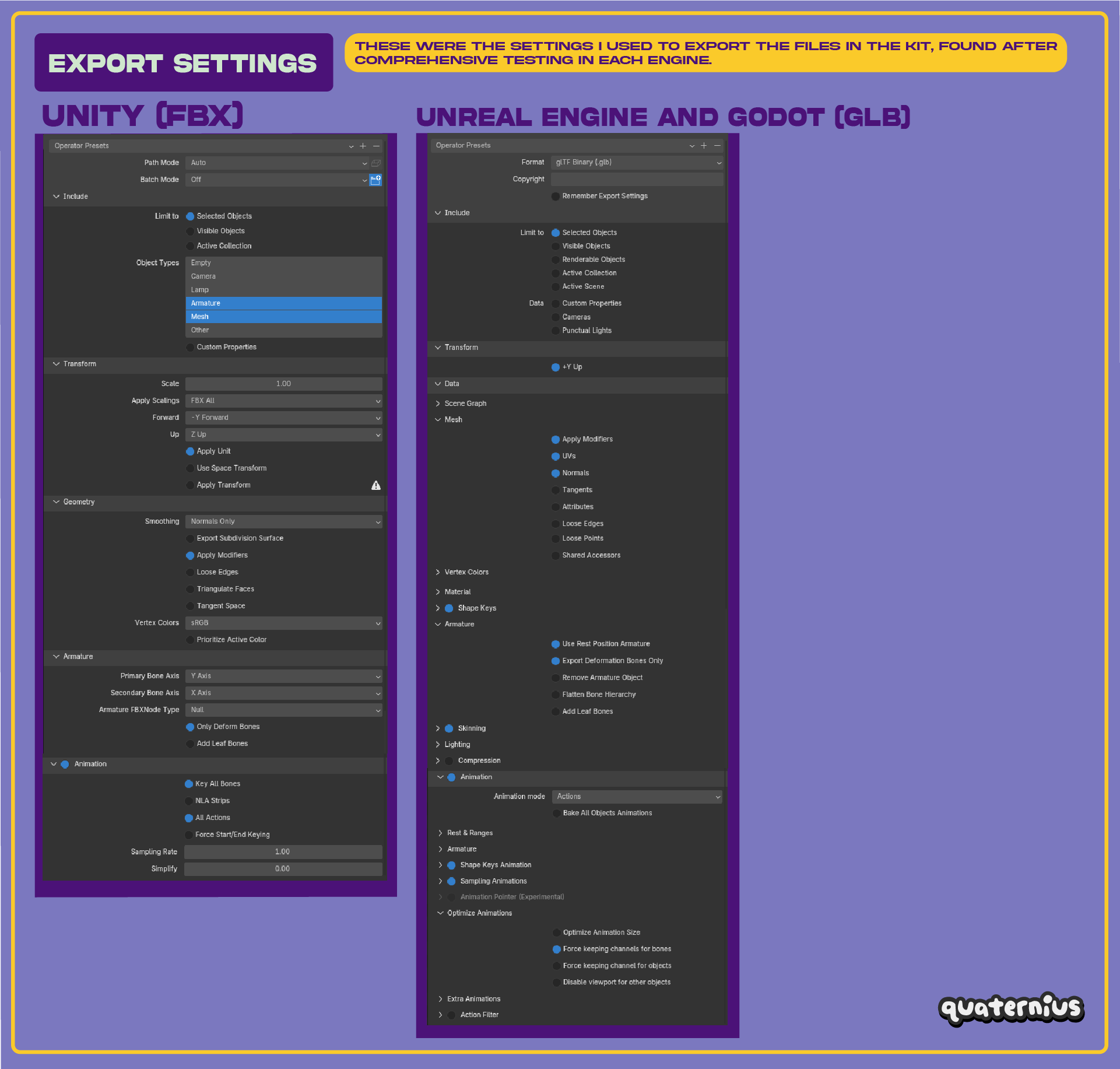
When you export the model (or new animations) from Blender to glTF, match the Quaternius kit's export settings — most importantly Animation mode = Actions, +Y Up, Use Rest Position Armature, and Force keeping channels for bones (so every bone track survives):
Creators only rig a model on the shared skeleton; the code brings the animation library to it. Keep every humanoid on the same UAL bone names, run the converter once, and everything downstream — locomotion, stances, head-look, the belt holster, the head-mounted torch — keeps working for free.