Collision layers & masks
Every physical object in the game — a player, a vehicle, a box, a door handle, an invisible trigger zone — lives on the game server, where the physics engine (Jolt) checks who touches what. This page explains the small system we use to tell the engine which objects are allowed to touch which — the collision layers and collision masks — and, just as important, why we bother.
You don't need to be a physics programmer to read this. If you build or edit a Godot scene that has a body or an area in it (a prop, a vehicle, a zone), you set these two values, and this page tells you what to put.
The idea in one picture
Each physics node answers two separate questions:
| Question | The field | Plain meaning |
|---|---|---|
| What am I? | Layer | The category this object belongs to. A player is on the player layer, a box on the prop layer, a vehicle on the vehicle layer. |
| What do I want to bump into / detect? | Mask | The categories this object looks for. A moving box looks for the ground, players, vehicles and other props. |
Two objects interact only when one's Mask contains the other's Layer. Think of it as:
Layer = the badge I wear. Mask = the list of badges I react to.
The one rule that surprises everyone: detection is one-directional
You do not need both objects to point at each other. One side looking is enough.
This is why a static object — the ground, a building, the fixed part of a scene — has its
Mask set to empty (0). It wears its badge (world) but looks for nothing. It never wastes a
single check scanning the world. The moving objects (players, vehicles, props) carry the
world badge in their mask, so they find the ground. The result is identical — the player
stands on the floor — but only the player does the looking.
🔑 Rule of thumb: anything that never moves on its own should have Mask = 0. The things that move will find it.
The six named layers
We renamed Godot's numbered layers (Project Settings → Layer Names → 3D Physics) so they read in plain words instead of “Layer 1, Layer 2…”. There are six:
| # | Layer name | What goes on it |
|---|---|---|
| 1 | world | Static, never-moving geometry: terrain, buildings, the fixed collision of a scene. |
| 2 | player | The players' bodies. |
| 3 | vehicle | Vehicles (truck, rover…). |
| 4 | prop | Movable objects: boxes, rocks, carriables — anything physics can push. |
| 5 | zone | Passive proximity zones: seats, cargo areas, gravity fields, spawn areas. Invisible volumes that don't collide with anything — they just wait to be entered. |
| 6 | interactable | Look-at targets: door handles, consoles, carriable pick-up points. The things your view-ray can point at to interact. |
zone and interactable?They feel similar (both are invisible volumes you "reach"), but they must be separate layers.
When you sit in a vehicle, your interaction ray must be able to hit the door handle
(interactable) to get out. If seats and handles shared one layer, the ray would hit the seat
zone you're sitting in first and you could never grab the handle. Keeping them apart lets each
ray look at exactly the right kind of thing.
Ready-made mask groups
Rather than re-ticking the same boxes by hand everywhere (and getting it subtly wrong), the code
defines three named masks in globals.gd. Set the mask in the inspector to match one of
these, and use the constant name in code:
| Constant | Includes | Used by |
|---|---|---|
MASK_SOLID | world + player + vehicle + prop | Everything that moves and collides physically: players, vehicles, pushable props. "Bump into anything solid." |
MASK_PROBE | zone | The single player probe that detects the passive zones around the player (which seat / gravity field / spawn area they're in). |
MASK_OBSTACLE | world + vehicle + prop | Line-of-sight and tool rays — a ray that should be blocked by solid geometry but ignore other players and invisible zones. |
The layer / mask matrix
Here is what the main object families actually use. This is the table to copy from when you build a new scene:
| Object | Layer | Mask | Why |
|---|---|---|---|
| Player body | player | MASK_SOLID (world+player+vehicle+prop) | Walks on the ground, bumps vehicles/props/other players. |
| Vehicle | vehicle | MASK_SOLID | Drives on the ground, collides with players, props and other vehicles. |
| Movable prop (box, rock…) | prop | MASK_SOLID | Physics can push it against anything solid. |
| Static geometry (terrain, building, a scene's fixed collision) | world | 0 (nothing) | It never moves — the movers above find it. |
| Passive zone (seat, cargo area, spawn) | zone | 0 (nothing) | It doesn't chase anyone; the player's probe finds it. monitoring is off. |
| Interactable (door handle, console) | interactable | 0 (nothing) | It waits to be pointed at; the interaction ray does the looking. |
| A detector that must catch one specific type (e.g. a mining trigger that reacts to players) | 0 | just that one layer (e.g. player) | It only ever cares about one category — don't make it scan the rest. |
A gravity field (planet gravity, an artificial grid) is on the zone layer, but its mask is
MASK_SOLID, not 0 — because it genuinely has to find the props and vehicles it should pull.
Give a gravity zone Mask 0 by reflex and everything inside it floats.
Rays and their masks
Rays are cast to "look" in a direction. A ray's mask decides what it can hit — so a ray only ever reports the kind of thing it's meant to find:
| Ray | Mask | What it hits |
|---|---|---|
| Interaction ray (on the player camera) | interactable | Door handles, consoles, pick-up points — the things you press E on. |
| Tool / line-of-sight ray (mining tool, aiming, "can I see it?") | MASK_OBSTACLE (world+vehicle+prop) | Solid geometry and objects, while ignoring other players and invisible zones. |
| Player probe (proximity area, not a raycast, but same idea) | MASK_PROBE (zone) | The passive zones the player is standing in. |
In code, build these with the helper Globals.make_camera_ray(camera, length, mask, ...) so the
setup stays consistent.
Worked example — the truck
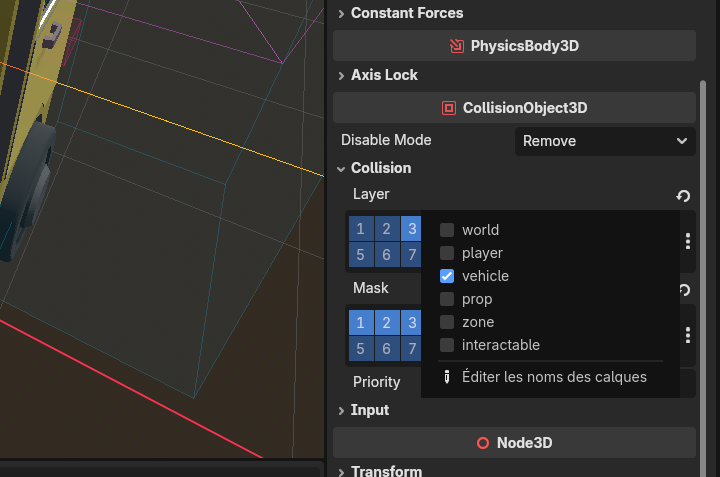
Select the truck's VehicleBody3D in Godot and open CollisionObject3D → Collision. You set two
things.
Layer — what the truck is: just vehicle.
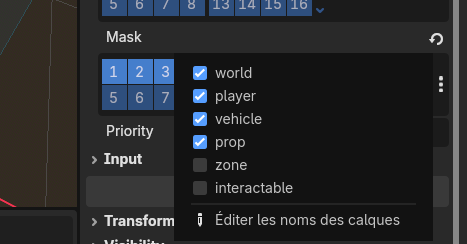
Mask — what the truck collides with: world + player + vehicle + prop (that's
MASK_SOLID). Notice zone and interactable are off — the truck body shouldn't physically
crash into invisible seat volumes or door-handle markers; those are handled by their own areas and
rays.
Its own sub-parts follow the matrix above: the seat areas are zone / Mask 0 with monitoring
off, and the door-handle areas are interactable / Mask 0.
Why we do it this way
Two reasons — one about speed, one about correctness.
1. Speed: fewer pointless checks
The physics engine checks pairs of objects. Two objects form a pair to test only if their layers/masks overlap. Early on, everything sat on the same layer with the same mask, so the engine tested every object against every other object — with thousands of bodies that is millions of checks per frame, and the server crawled (it dropped to ~2 FPS).
Giving each thing a precise layer and a mask containing only what it truly needs removes the useless pairs: two boxes far apart on different concerns no longer get compared, static geometry (Mask 0) never initiates a single check, and rays stop reporting things they should ignore.
Pruning pairs makes a real difference, but if you deliberately keep object-vs-object collisions on (players can push each other, props pile up), the engine still has a lot of genuine pairs to solve. The heavier server-side win comes from not simulating distant, settled objects at all — a separate mechanism. Layers are the tidy foundation; they are not a magic FPS button on their own.
2. Correctness: the right thing reacts
Layers also stop objects from reacting to the wrong things: your interaction ray hits the door handle instead of the seat you're in, a mining trigger reacts to players and not to passing rocks, a gravity field pulls props but a seat volume ignores them. Getting the layer/mask right is often the difference between a feature that "sometimes works" and one that always does.
When you build a scene: set the layer & mask
Set the Layer and Mask directly in the Godot inspector (they save into the .tscn), using
the matrix above. Keep code-side changes only for things that genuinely change at runtime (a
player sitting down, terrain generated on the fly). A prop that arrives on-screen with the wrong
layer/mask will fall through the floor, get ignored by tools, or silently tank the server's frame
rate — and it's invisible until someone notices in play. Two ticks in the inspector prevent all of
it.
See also
- Props network management — building a movable object.
- Adding a vehicle — the truck, end to end.
- Adding a tool — tools that cast rays.