Traversal — vault, climb & step-up
Player network management explains the server-authoritative loop this builds on. Traversal is decided on the server, like every other gameplay action.
Walk into an obstacle and the character crosses it, with no move to learn: a low kerb is stepped up
on its own, and against a waist-high crate or a chest-high ledge you press jump and the character
vaults over or climbs onto it instead of hopping into it. It is fully server-authoritative
and replicated, and it reuses the already-whitelisted action field (like the jump), so no
Horizon change is needed.
Step-up is small and continuous, so doing it silently is right — you walk up a kerb without thinking about it. A vault is a committed move that takes over the body for a moment, and triggering it purely on proximity fired it when the player only meant to walk past. It therefore consumes the pending jump request: the jump you asked for becomes the vault, and it is spent, so you do not land on the ledge and immediately hop off it.
How a VAULT is detected — the trace (raycast) probe
Detection is a small, shared helper — VaultProbe (vault_probe.gd) — used by two callers (DRY):
the server, which acts on it, and the owner's debug HUD, which just shows it. It's the classic
"trace-based mantle" recipe used across the industry: a few line traces (raycasts) that answer "is
there a climbable ledge right in front of me?".
From the body's feet, looking along the way it faces, it casts (all against solid obstacles —
MASK_OBSTACLE = world / vehicle / prop — ignoring the player's own body):
                        | (3) CLEARANCE ray, up: room to STAND on the ledge?
                        v
      +-----------------+--------------+
      |         ledge top   <----------+---- (2) TOP ray, down from above, a bit past the
      |                                |          face: the walkable surface + its height H
      |   ==>|  (1) FACE ray, forward just below the lip: a steep wall?
      |      |            (a walkable slope is rejected here)
   ___|      |___________________________
      feet
- Top ray — cast down from well above, a little past the face, to find the top surface and
measure its height
Habove the feet. Its normal must point roughly up (a walkable top, not the continuing face of a slope). This runs first, so the debug HUD can always showHeven when the rest fails. - Face ray — cast forward, just below the lip (
H − vault_face_margin), which must hit a near-vertical face. A gentle slope reads as walkable here and is rejected — you just walk up it. Probing near the lip (not at a fixed knee height) is what lets an elevated ledge — a platform with a gap under it — be detected too, not only ground-based obstacles. - Clearance ray — cast up from the ledge top: there must be head-room to stand on it.
If all pass, the measured height H picks the move.
Height bands → which move
Obstacle height H | Move | Feel |
|---|---|---|
below vault_min_height (~0.5 m) | step-up | a low kerb — you just walk up it. Its own probe, see below |
vault_min_height … vault_low_max (~0.9 m) | SafetyVault | a vault-over — up, over, down the far side |
vault_low_max … vault_climb1_max (~1.7 m) | ClimbUp_1m | climb onto the ledge |
vault_climb1_max … vault_max_height (~2.3 m) | ClimbUp_2m | climb onto a tall ledge |
above vault_max_height | nothing | too tall — a wall |
How a STEP is detected — the swept collider
Below the vault threshold the obstacle is not the vault's business, and it is not detected with
rays. StepProbe (step_probe.gd) sweeps the body's own collider three times:
   1. RISE          2. ADVANCE            3. DROP
   lift the body    push it forward       let it fall back
        ^                ==>                    v
        |            +---------+           +---------+
        |            |         |           |  <-- it lands HERE: that is the step,
     ___|___         |         |           |      and how far the drop fell short
                                                  of the lift is its height
Where the swept body lands is the step, and rise − drop is its height. Nothing is
reconstructed from an offset, so the landing cannot disagree with the collider that has to fit there a
moment later. Headroom over the step is checked by the same sweep, for free.
Why not rays, when the vault uses them
A vault is a committed move against a big, deliberate obstacle: a few line traces describe it well. A step is a centimetre-scale question against whatever the level happens to be made of, and there a ray samples a point — whether it hits depends on where that one point lands on a chamfer, a joint between two meshes, or a lip thinner than the ray is precise.
Measured in game before the rewrite: a 0.21 m step was climbed while a 0.18 m one was refused, and the same step at the same height was taken one moment and turned down the next. A swept shape integrates over the whole contact area and cannot fall down that gap.
The lift is as small as necessary
The rise is tried smallest first (a quarter, a half, then the full vault_min_height), stopping at
the first that lets the body through. That is not an optimisation — it is a correctness fix:
Raising a 1.8 m body by 0.5 m makes it a 2.3 m body, and it then has to fit through the very opening it was about to walk through. Measured in a doorway: the rise clipped to 0.434 m by the lintel, the advance then blocked at 0.001 m by the wall above the door — a 7 cm step refused because the body had been made too tall for the door. A 7 cm step needs a 7 cm lift, which passes under any lintel a walking body already passes under.
There is no walkability verdict
The probe does not reject a step for having a sloped top. On a staircase the same step was refused at a flatness of 0.60 and climbed at 0.60 — every reading crowded against the threshold, falling either side of it on rounding. One normal describes one triangle of a bevelled or tessellated top, not whether you can stand on it.
The two things that test was meant to prevent are both covered elsewhere, and covered by volume: a
wall stops the advance dead (the tall verdict), and whether a slope can be held is
floor_max_angle, applied a frame later by move_and_slide on the real body.
How the move is performed
Because the server owns the position (it scripts and replicates it), the body is moved by a short scripted glide, not by animation root motion (which would fight the replicated position). Each glide eases the body from its start to a computed landing over a tunable duration, and replicates the pose each tick like a normal move:
- Step-up — a short, silent glide (no clip): the body lifts onto the step and nudges forward
past its edge, so it works at any speed (a plain lift stalled at a slow walk, waiting on momentum
to clear the edge). No cooldown, so stairs climb freely; velocity is kept, so walking resumes with its
momentum. This fills the gap Godot's
CharacterBody3Dleaves — it does not step up on its own. - SafetyVault — a vault-over: the landing is on the far-side ground, and the path is an arc (up over the obstacle, back down), the trajectory a root-motion clip would bake, done server-side.
- ClimbUp_1m / 2m — climb onto: the landing is the ledge top.
The matching clip (from the animation set's Climb group) plays as a one-shot on every body — the
server sends vault:<key>:<height>:<n> on the action field; the client turns it into the clip. The
height lets the animator align the pose to the obstacle (per-type offsets — see
Character animation).
Tuning
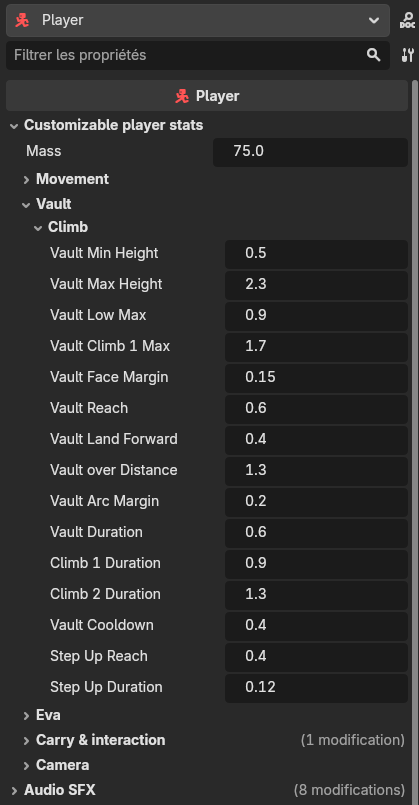
Everything is on @export knobs on the Player node, under Customizable player stats → Vault /
climb: the height thresholds, the detection reach (vault_reach), the face-check depth
(vault_face_margin), the vault-over distance and arc, per-clip glide durations, the step-up reach and
duration, and the cooldown. The per-type animation pose offsets live on the CharacterAnimator.
Turn on the movement debug (Settings) and the on-screen readout adds a second line —
can vault: 1.05m -> climb_1m (or 0.35m (slope), — (clear), …). Walk up to any obstacle to see its
measured height and the decision in real time; it reads the same probe the server acts on.
A third line, can step: 0.16m -> yes, does the same for the step sweep. When a step is refused the
server prints why ([StepUp] refuse: tall montee=0.434 avance=0.001 …) — the client's probe is
blank against terrain, because terrain collision is server-only.
The step sweep moves the whole collider forward, so a shallow step or a chamfered lip works: there is no single sample to land in the wrong place. The vault detection still samples the top a fixed distance ahead, so a very thin elevated ledge is best approached by its wide face. wide face.